Overview of Microsoft Intune enrollment architecture for Windows devices, including architecture components, enrollment methods, prerequisites, configuration steps, security considerations, and best practices.
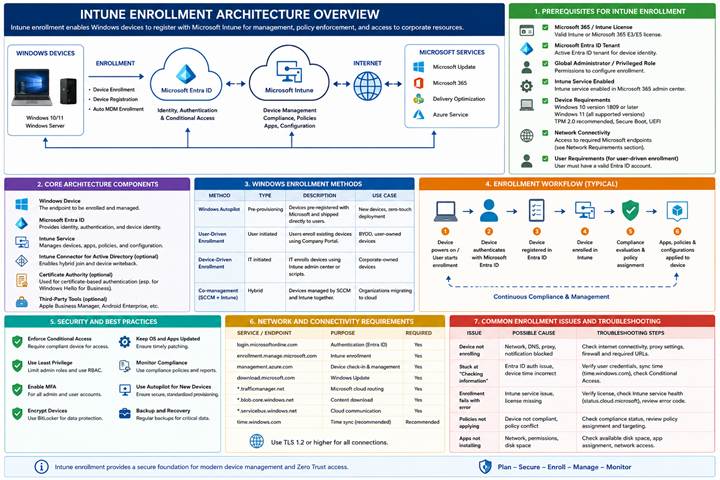
1. Intune Enrollment Architecture Overview
Microsoft Intune provides cloud-based modern device management for Windows devices. The enrollment architecture integrates Microsoft Entra ID, Windows Autopilot, Microsoft Intune, compliance policies, security baselines, and application deployment.
2. Prerequisites for Intune Enrollment
- Microsoft Intune license assigned to users (Microsoft 365 E3/E5, EMS E3/E5, Business Premium, Intune standalone etc.).
- Microsoft Entra ID (Azure AD) tenant configured.
- Supported Windows operating systems: Windows 10/11 Pro, Enterprise, or Education.
- Internet connectivity for device communication with Microsoft cloud services.
- Device enrollment restrictions configured in Intune.
- MDM authority configured as Microsoft Intune.
- Users added or synchronized to Microsoft Entra ID if on-premises AD using.
- Automatic MDM enrollment enabled for Windows devices.
- Windows Autopilot configuration (optional for zero-touch deployment).
- Hybrid Azure AD Connect configured for hybrid environments.
- DNS and firewall rules allowing Microsoft endpoints.
- Administrator permissions for Intune and Entra ID management.
3. Core Architecture Components
- Windows Devices: Windows 10/11 devices enrolled into Intune using Azure AD Join, Hybrid Join, or Autopilot.
- Microsoft Entra ID: Provides identity, authentication, device registration, and conditional access integration.
- Microsoft Intune: Cloud-based endpoint management platform used for policies, applications, compliance, and security management.
- Windows Autopilot: Simplifies device provisioning and enrollment with zero-touch deployment.
- Configuration Profiles: Used to configure device settings, Wi-Fi, VPN, security baselines, and compliance.
- Compliance Policies: Ensures devices meet organizational security requirements before accessing resources.
- Conditional Access: Controls access to corporate resources based on compliance and identity signals.
4. Windows Enrollment Methods
- Azure AD Join Enrollment
- Hybrid Azure AD Join Enrollment
- Windows Autopilot Enrollment
- Bulk Enrollment using Provisioning Package
- Co-management with Configuration Manager (SCCM/MECM)
- Manual Enrollment through Company Portal
5. Enrollment Workflow
- User powers on the Windows device.
- Device connects to the internet.
- User signs in with Microsoft Entra ID credentials.
- Device registers or joins Microsoft Entra ID.
- Automatic MDM enrollment triggers Microsoft Intune enrollment.
- Intune applies configuration profiles, compliance policies, and security settings.
- Applications and updates are deployed.
- Conditional Access validates compliance before granting access.
6. Security and Best Practices
- Enable Multi-Factor Authentication (MFA) for all administrators and users.
- Use Conditional Access policies to restrict access from non-compliant devices.
- Apply security baselines for Windows devices.
- Configure BitLocker encryption policies.
- Use Defender for Endpoint integration for advanced security monitoring.
- Implement role-based access control (RBAC) in Intune.
- Regularly monitor enrollment and compliance reports.
- Use Windows Autopilot for secure device provisioning.
7. Network and Connectivity Requirements
- Allow access to Microsoft Intune and Entra ID endpoints.
- Configure proxy and firewall settings for Microsoft services.
- Ensure devices can communicate over HTTPS (TCP 443).
- Validate DNS resolution for Microsoft cloud services.
- Allow Windows Update and Microsoft Store endpoints.
8. Common Enrollment Issues and Troubleshooting
- User not licensed for Intune.
- MDM auto-enrollment not configured.
- Enrollment restrictions blocking devices.
- Device already enrolled in another MDM solution.
- Network connectivity or firewall blocking Microsoft endpoints.
- Incorrect Azure AD Join configuration.
- Expired or invalid certificates.
9. Conclusion
Microsoft Intune enrollment architecture enables secure and scalable modern management for Windows devices. By integrating Microsoft Entra ID, Intune, and Windows Autopilot, organizations can automate deployment, enforce compliance, and improve endpoint security.