Microsoft Intune Deployment Guide: Optimization, Security & Best Practices
Welcome to my post again!
After completing your Microsoft Intune setup, the next step is optimization. This guide will help you improve security, automate management, and scale your environment.
Tip: Always start with a small pilot group before full deployment.
📊 Download Full Guide (PDF)
Download Intune Deployment PDF Guide
Intune Architecture Flow
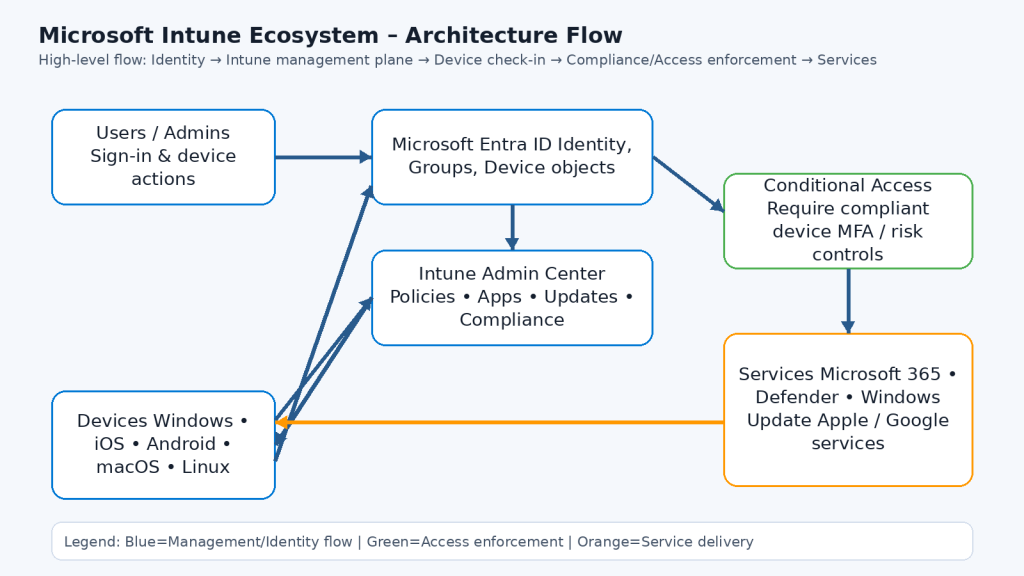
1. Optimize & Expand Your Environment
- Use Entra ID dynamic groups
- Support iOS, Android, macOS, Linux
- Enable Conditional Access
- Use Windows Autopilot
2. Windows Autopilot Deployment
Run this PowerShell:
Get-WindowsAutoPilotInfo.ps1 -OutputFile Autopilot.csv
- Create deployment profile in Intune
- Assign to dynamic group
- User signs in → device auto-configures
Device setup becomes fully automatic
3. Application Management
- Required Apps: VPN, Office, Security tools
- Optional Apps: Company Portal
- Use App Protection for BYOD devices
Do not deploy too many apps at once
4. Policy Enhancement
- Define compliance (OS, BitLocker, Antivirus)
- Use Settings Catalog
- Apply Security Baselines
5. Update & Patch Management
- Create Update Rings
- Control reboot policies
- Monitor patch compliance
Goal: Keep systems updated within 14 days
6. Security & Access Control
- Enable Conditional Access
- Use Multi-Factor Authentication
- Integrate Microsoft Defender
Strong identity + device security = Zero Trust
7. Monitoring & Health
- Use Endpoint Analytics
- Set alerts for failures
- Use remote troubleshooting
8. Documentation & Training
- Create IT runbook
- Train IT team monthly
- Provide simple user guides
9. Continuous Improvement
- Review policies quarterly
- Check compliance weekly
- Test updates before rollout
- Collect user feedback
“Intune is a continuous process, not a one-time setup”
FAQ
- What is Intune? Cloud-based device and app management solution
- Why Autopilot? Zero-touch deployment
- Why Conditional Access? Secure access using device compliance
Tips
- Run a pilot with 5 devices
- Create dynamic groups
- Schedule weekly compliance review