Beyond MDM: The Complete Cloud Management Platform
If you search online for how Intune works, many explanations focus only on device check-in cycles and policy sync intervals. Those details matter, but they only tell part of the story.
Microsoft Intune is a unified solution for modern endpoint management. It is not just about pushing policies. It also supports self-service, secures remote workers, integrates with Microsoft Defender, and helps organizations implement Zero Trust principles.
This guide explains each functional area, shows how they work together, and highlights practical takeaways for IT administrators.
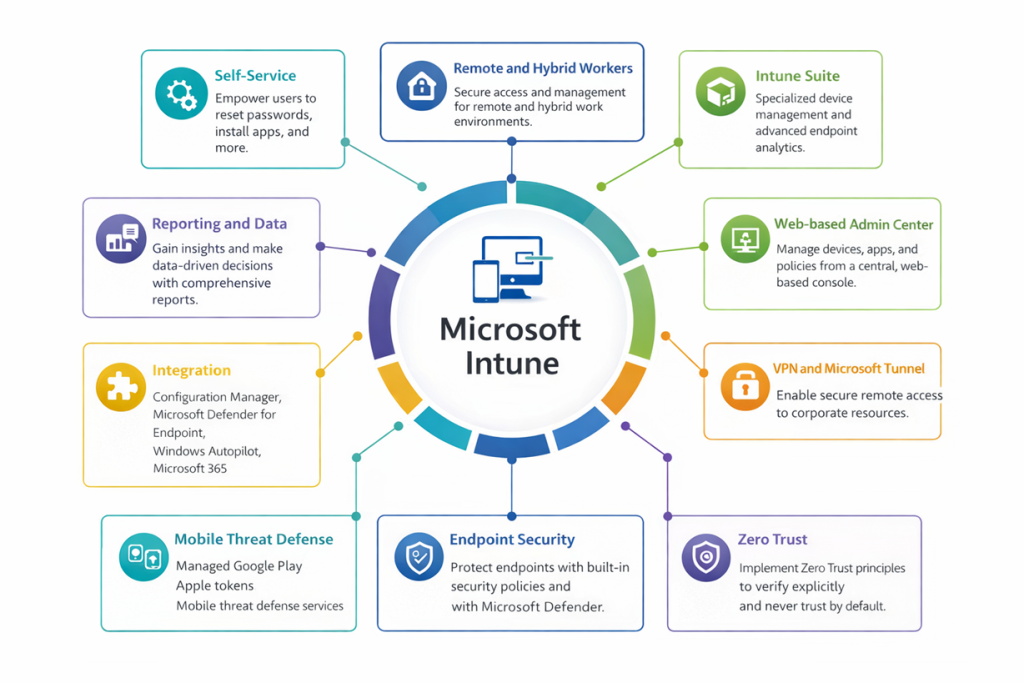
The Core: Microsoft Intune and Endpoint Security
At the center of this solution is Microsoft Intune, with Endpoint Security as a primary pillar.
How it works: Intune is a cloud-native service hosted in Azure that manages devices and applications. Endpoint Security includes built-in policies that help secure devices, such as firewall, antivirus, disk encryption, and attack surface reduction settings, all managed from the same console.
- No on-premises infrastructure is required.
- Security policies are separate from configuration profiles but managed together.
- Integration with Microsoft Defender for Endpoint brings advanced threat detection into the same management experience.
Admin takeaway: Start with Endpoint Security policies before broad configuration profiles. A secure device is the foundation for everything else.
Web-Based Admin Center: Your Control Plane
Full name: Microsoft Intune admin center
How it works: The Intune admin center is the main web console where you manage devices, applications, policies, and reports. It is built for endpoint management and serves as the central place for day-to-day administration.
- Manage devices across Windows, iOS, Android, and macOS
- Manage apps, including deployment, updates, monitoring, and removal
- Create and assign policy types
- Access reports and analytics
Admin takeaway: Use the Intune admin center as your single source of truth for endpoint management activities.
Self-Service: Empowering Users and Reducing IT Work
How it works: Through the Company Portal app and website, users can perform common support tasks without contacting the help desk.
- Reset passwords through Entra ID self-service password reset
- Install available applications
- Enroll personal or corporate devices
- Sync devices to receive the latest policies
- Find IT support contact information
Admin takeaway: Clearly communicate self-service features to users. Even a short guide can significantly reduce help desk volume.
Remote and Hybrid Workers: The Primary Use Case
How it works: Intune was designed for modern work environments where devices are often outside the corporate network. It manages devices over the internet without requiring a VPN for normal management traffic.
- Secure access to company resources from almost anywhere
- Policy enforcement whether a device is on home internet, public Wi-Fi, or the office network
- Application deployment without the device touching the corporate LAN
Admin takeaway: Review Conditional Access settings so remote users can work securely without unnecessary access blocks.
VPN and Microsoft Tunnel: Secure Connectivity
| Feature | Purpose | When to Use |
| VPN profile | Push standard VPN settings to devices | When you already have an existing VPN infrastructure |
| Microsoft Tunnel | Provide app-level secure access for mobile scenarios | When you want to protect data in managed apps without enrolling the whole device |
Microsoft Tunnel in MAM-only scenarios: Instead of a full-device VPN, Microsoft Tunnel can provide app-level connectivity for managed apps on iOS and Android, while personal traffic remains separate.
Admin takeaway: Use traditional VPN profiles for fully managed corporate devices and consider Microsoft Tunnel for BYOD or MAM-focused scenarios.
The Intune Suite: Advanced Capabilities
The Intune Suite is an add-on that expands core Intune with advanced management and support capabilities.