Attack Surface Reduction (ASR) Rules: Audit Mode to Block Mode, the Right Way
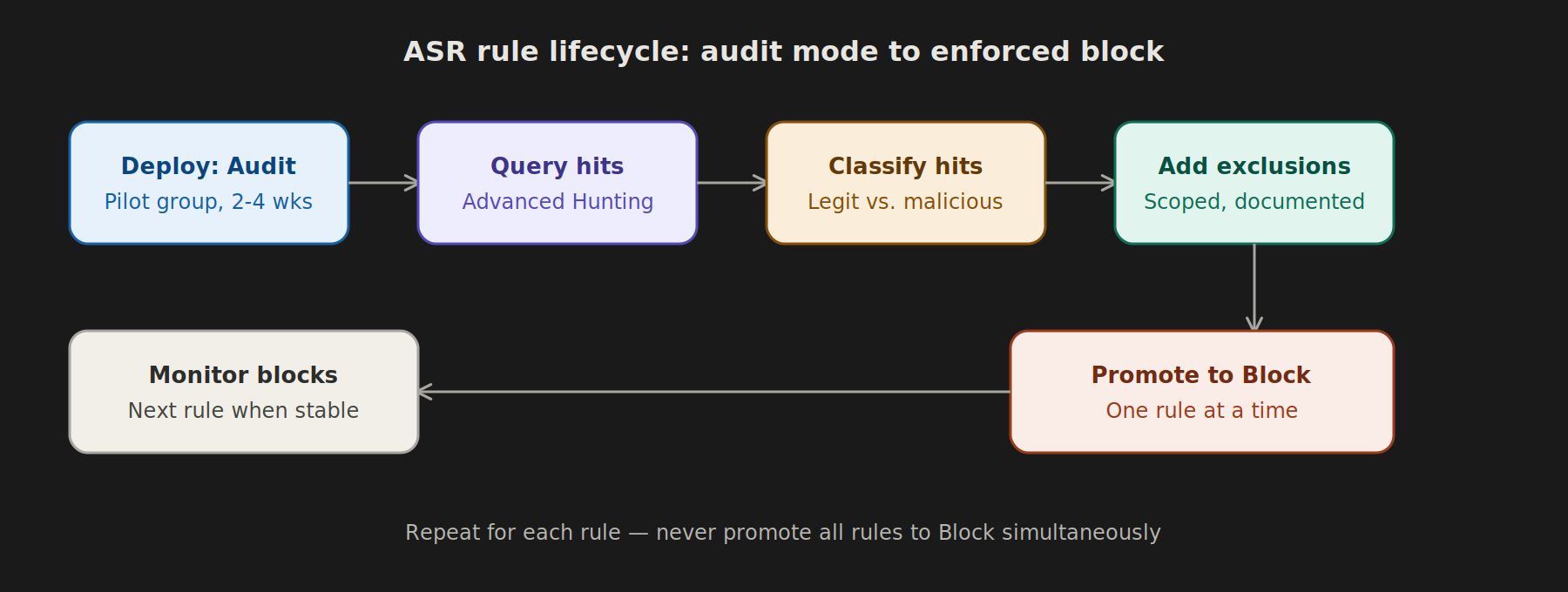
Attack Surface Reduction rules are one of the highest-value, lowest-cost controls in Microsoft Defender for Endpoint — but flipping them straight to Block without validation is how you end up with a flood of helpdesk tickets and an angry finance team whose macros stopped working. Here’s a disciplined path from Audit to Block.
What ASR Rules Actually Do
ASR rules target specific attack techniques — Office apps spawning child processes, credential theft from LSASS, obfuscated scripts, executable content from email clients — and either audit (log only) or block the behavior. Microsoft ships roughly 16 rules; not all are relevant to every environment on day one.
Step 1: Deploy in Audit Mode First — Always
Using Intune (Endpoint Security → Attack Surface Reduction → Create Policy), deploy your target rules in Audit mode across a representative pilot group — not your full tenant, and not just IT. Include:
- A sample of finance/accounting users (heavy macro/Excel usage)
- A sample of general knowledge workers
- Any users running legacy line-of-business apps
Step 2: Let It Run — Minimum 2–4 Weeks
Audit mode generates events without blocking anything, which is exactly what you want for a baseline. Rushing this step is the #1 cause of post-deployment incidents.
Step 3: Query Audit Hits via Advanced Hunting
DeviceEvents
| where ActionType startswith "Asr"
| where ActionType has "Audited"
| summarize Count = count(), Devices = dcount(DeviceId), Users = make_set(AccountName) by ActionType, FileName, InitiatingProcessFileName
| order by Count desc
This gives you a ranked list of which rules are firing, on what processes, and how many devices/users are affected — your triage starting point.
Step 4: Classify Each Hit
For every distinct ActionType / FileName / InitiatingProcessFileName combination, classify as one of:
- Legitimate business process — e.g., an approved macro-enabled reporting tool. Needs an exclusion.
- Legacy/unsupported tool — evaluate whether it should be retired instead of excluded.
- True malicious pattern — validates the rule is working; no action needed except confirming it’ll be blocked correctly.
Document exclusions with a business justification and an owner — this becomes your audit trail for compliance-sensitive clients (a must for banking and government tenants).
Step 5: Build Targeted Exclusions
In Intune, add file/folder or process exclusions scoped as narrowly as possible — avoid blanket exclusions like an entire C:\Program Files\ path unless truly necessary. A good exclusion targets the specific executable or script path triggering the false positive.
Step 6: Promote Rules to Block — One at a Time
Don’t flip all 16 rules to Block simultaneously. Promote in priority order based on ATT&CK relevance and your threat model, typically:
- Block credential stealing from LSASS
- Block executable content from email client and webmail
- Block Office applications from creating executable content
- Block Office applications from injecting code into other processes
- Block execution of potentially obfuscated scripts
Move each rule to Block, monitor for 1–2 weeks, then proceed to the next.
Step 7: Monitor Post-Block
After promotion, continue querying DeviceEvents for ActionType values containing "Blocked" rather than "Audited" — these are now real blocks, and any user-reported disruption should map back to a specific block event you can investigate and, if needed, add a scoped exclusion for.
A Note on Multi-Tenant / MSP Environments
If you manage this across multiple clients — government, banking, MNC — expect very different exclusion profiles per tenant. A rule set tuned for a call-center MNC will not translate cleanly to a bank’s LOB application stack. Keep exclusion policies tenant-specific rather than trying to build one universal baseline.
Summary Checklist
- ☐ Deploy in Audit mode to a representative pilot group
- ☐ Run for 2–4 weeks minimum
- ☐ Query and classify every audit hit
- ☐ Build scoped, documented exclusions
- ☐ Promote rules to Block one at a time
- ☐ Monitor block events post-promotion
For guidance on distinguishing genuine false positives from real threats during the classification step, see the companion article, Common False Positives in ASR Audit Logs (and How to Classify Them).