Common False Positives in ASR Audit Logs (and How to Classify Them)
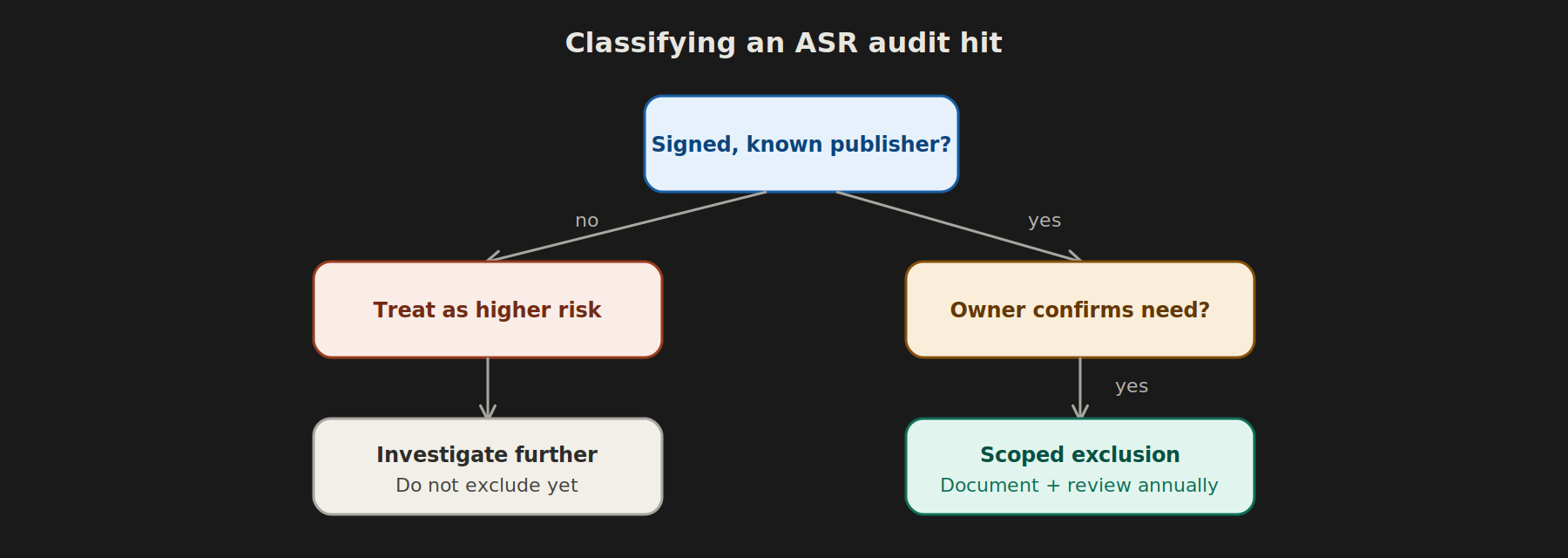
Once you’ve deployed Attack Surface Reduction rules in Audit mode (see the companion guide on moving from Audit to Block), the real work begins: sorting genuine risk signals from the noise of normal business software behaving in ways ASR rules are suspicious of. Here’s a practical classification guide organized by rule.
Why This Step Gets Rushed — and Shouldn’t
It’s tempting to skim the audit log, see a big number, and either exclude everything in sight or ignore it and flip straight to Block. Both approaches cause problems: over-excluding creates blind spots attackers can exploit; ignoring audit data means Block mode breaks business processes on day one. Classify deliberately.
Rule: Block Office Applications from Creating Child Processes
Common false positives:
– Mail merge or reporting add-ins that spawn cmd.exe or wscript.exe to generate files
– Legacy macro-based finance tools that shell out to helper executables
– Outlook add-ins launching companion apps
How to classify: Check InitiatingProcessFileName (should be an Office app like WINWORD.EXE/EXCEL.EXE) against FileName (the spawned child). If the child process is a known internal tool with a documented business purpose, it’s a candidate for a scoped exclusion. If it’s powershell.exe or cscript.exe with obfuscated arguments, treat as suspicious and investigate the source document.
Rule: Block Executable Content from Email Client and Webmail
Common false positives:
– HR or IT distributing internal .exe installers via email (bad practice, but common)
– Signed software updates delivered as email attachments by vendors
How to classify: Verify the file’s digital signature and hash against a known-good source (VirusTotal, vendor site). If legitimate, redirect distribution through SharePoint/Teams instead of excluding the rule — this is a process fix, not a technical exclusion.
Rule: Block Credential Stealing from the Windows Local Security Authority Subsystem
Common false positives: – Legitimate backup or endpoint management agents that read LSASS memory for licensing/health checks – Some older antivirus or credential-vaulting software
How to classify: This rule has a narrow, high-value purpose (blocking Mimikatz-style credential dumping). False positives here are rarer and should be scrutinized carefully — verify the initiating process against your approved software inventory before excluding. When in doubt, don’t exclude; work with the vendor to update the tool instead.
Rule: Block Execution of Potentially Obfuscated Scripts
Common false positives: – Minified/obfuscated JavaScript from legitimate web-based deployment tools – PowerShell modules that use base64 encoding for legitimate configuration payloads (some RMM/patch tools do this)
How to classify: Obfuscation itself isn’t proof of malice, but it is a strong prioritization signal. Check whether the script originates from a trusted, signed source (an RMM agent you deployed yourself) versus an unknown or user-downloaded source. Trusted internal tooling can be excluded by path or publisher certificate; anything unexplained warrants investigation.
Rule: Block Win32 API Calls from Office Macros
Common false positives: – Legacy Excel/Access tools built by internal developers years ago that call Win32 APIs for legitimate automation (file system access, printer control)
How to classify: These are often genuinely old internal tools rather than attacks. Confirm with the business owner, then decide: exclude, or use this as leverage to finally modernize the tool (many of these predate current staff and nobody remembers why they exist).
A General Classification Framework
For any audit hit, work through these questions in order:
- Is the initiating process signed and from a known publisher? If no → treat as higher risk.
- Does the business owner recognize and confirm this activity? If no → investigate further before excluding.
- Is this activity consistent and repeated across many devices, or isolated to one? Widespread + consistent = likely legitimate software behavior. Isolated + unusual = investigate that specific device/user.
- Would blocking this break a documented, necessary business process? If yes → scoped exclusion with a business justification on file. If no → let it move to Block.
Documentation Matters More Than the Decision
For regulated clients (banking, government), auditors care less about which specific exclusions you made and more about whether you can show a repeatable, documented process for how each was evaluated. Keep a simple log: rule, process, classification, decision, owner, and date reviewed. Revisit exclusions at least annually — a “temporary” exclusion for a legacy tool that gets decommissioned should be removed, not forgotten.
Related Reading
For the full lifecycle from initial audit deployment through Block promotion, see Attack Surface Reduction (ASR) Rules: Audit Mode to Block Mode, the Right Way.