Advanced Hunting 101: Writing KQL Queries in Microsoft Defender XDR
Advanced Hunting is where Defender XDR stops being a dashboard and starts being an investigation tool. If you’re new to it, this guide covers the schema, query fundamentals, and a few real hunting patterns you can start using today.
What Advanced Hunting Actually Is
Advanced Hunting lets you query raw telemetry across Defender for Endpoint, Defender for Identity, Defender for Office 365, and Defender for Cloud Apps using Kusto Query Language (KQL) — the same language behind Sentinel and Log Analytics. Unlike alerts (which are pre-built detections), hunting queries let you ask your own questions of the data.
The Core Tables You’ll Use Most
| Table | What it Covers |
|---|---|
DeviceProcessEvents |
Process creation on endpoints |
DeviceNetworkEvents |
Network connections from devices |
DeviceFileEvents |
File creation, modification, deletion |
DeviceLogonEvents |
Local and remote logons |
EmailEvents / EmailAttachmentInfo |
Office 365 mail flow and attachments |
IdentityLogonEvents |
Defender for Identity sign-in activity |
AlertInfo / AlertEvidence |
Raised alerts and their evidence entities |
KQL Fundamentals for Hunters
A hunting query is a pipeline: start with a table, filter down, then shape the output.
DeviceProcessEvents
| where Timestamp > ago(24h)
| where FileName =~ "powershell.exe"
| where ProcessCommandLine has_any ("-enc", "-EncodedCommand", "IEX", "DownloadString")
| project Timestamp, DeviceName, AccountName, ProcessCommandLine, InitiatingProcessFileName
Key operators worth knowing early:
where— filter rowsproject— pick/rename columnssummarize— aggregate (counts, distinct values)join— correlate across tables (e.g., process events to network events)has_any/contains— string matching (has_any is faster; uses word-boundary tokenization)
A Practical Hunting Pattern: Suspicious PowerShell → Network Egress
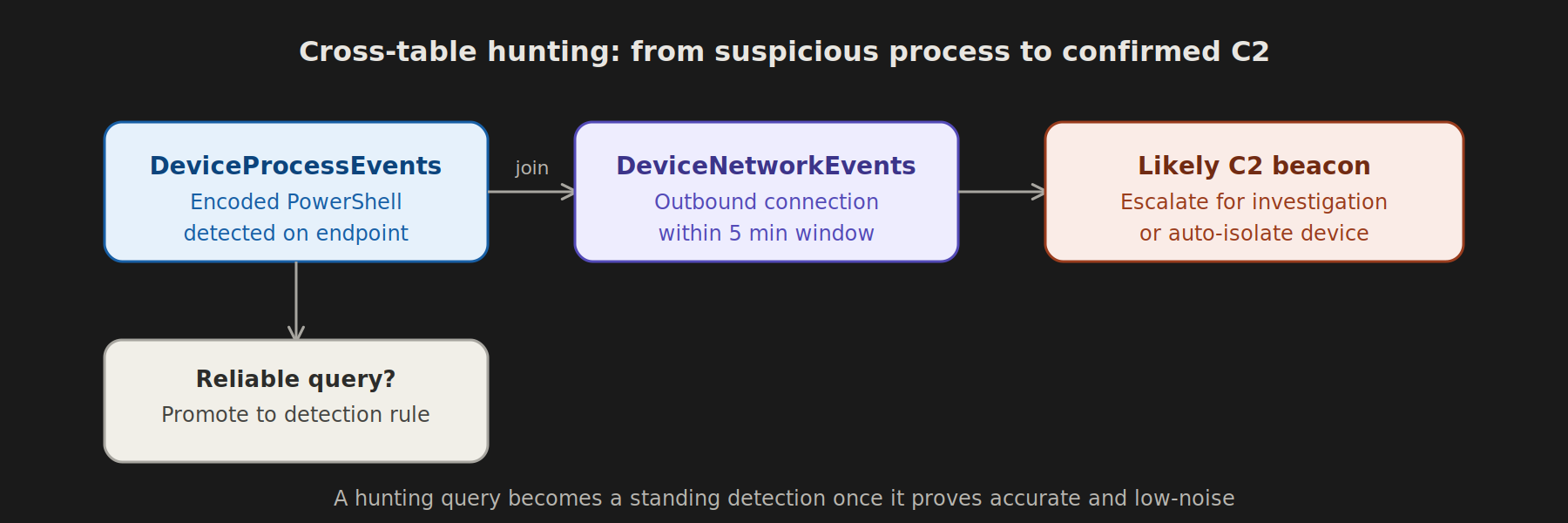
Encoded PowerShell reaching out to the internet is a classic post-exploitation pattern. Join process and network telemetry:
let SuspiciousPS = DeviceProcessEvents
| where FileName =~ "powershell.exe"
| where ProcessCommandLine has_any ("-enc", "-nop", "-w hidden", "IEX")
| project DeviceId, ProcessId = ProcessId, Timestamp, AccountName, ProcessCommandLine;
DeviceNetworkEvents
| where Timestamp > ago(24h)
| join kind=inner (SuspiciousPS) on DeviceId
| where Timestamp between ((Timestamp1) .. (Timestamp1 + 5m))
| project Timestamp, DeviceName, AccountName, RemoteIP, RemoteUrl, ProcessCommandLine
This surfaces devices where obfuscated PowerShell ran and then made an outbound connection within 5 minutes — a strong candidate for a C2 beacon.
Hunting for Lateral Movement via Identity
IdentityLogonEvents
| where ActionType == "LogonSuccess"
| where LogonType == "Network"
| summarize DistinctTargets = dcount(TargetDeviceName), Devices = make_set(TargetDeviceName) by AccountName, bin(Timestamp, 1h)
| where DistinctTargets > 5
An account authenticating to 5+ distinct hosts within an hour is worth reviewing — it’s a common signature of an attacker pivoting with harvested credentials.
Turning a Hunting Query into a Detection
Once a hunting query proves reliable and low-noise, promote it:
- In Advanced Hunting, click Create detection rule.
- Set frequency, alert title, severity, and MITRE ATT&CK technique.
- Choose the response action (isolate device, disable user) if you want automated containment — start with alert-only until you trust the signal.
Tips for Reducing False Positives While Learning
- Scope broad queries to a pilot device group first, not the whole tenant.
- Use
AccountName !in (KnownServiceAccounts)to exclude known noisy service accounts. - Cross-reference with
DeviceInfoto filter by OS or device role (e.g., exclude jump boxes that legitimately run admin PowerShell).
Where to Go From Here
Once comfortable with single-table queries, move into cross-table joins (identity + endpoint + email) — this is where Advanced Hunting earns its keep, letting you trace an attack chain from a phishing email, to a macro execution, to lateral movement, in one query. That’s also the foundation for building the Sentinel analytics rules covered in the companion guide on building your first rule.